
SPC UV Chorus
A chorus that stays in key.
“Width, shimmer, and music theory.”
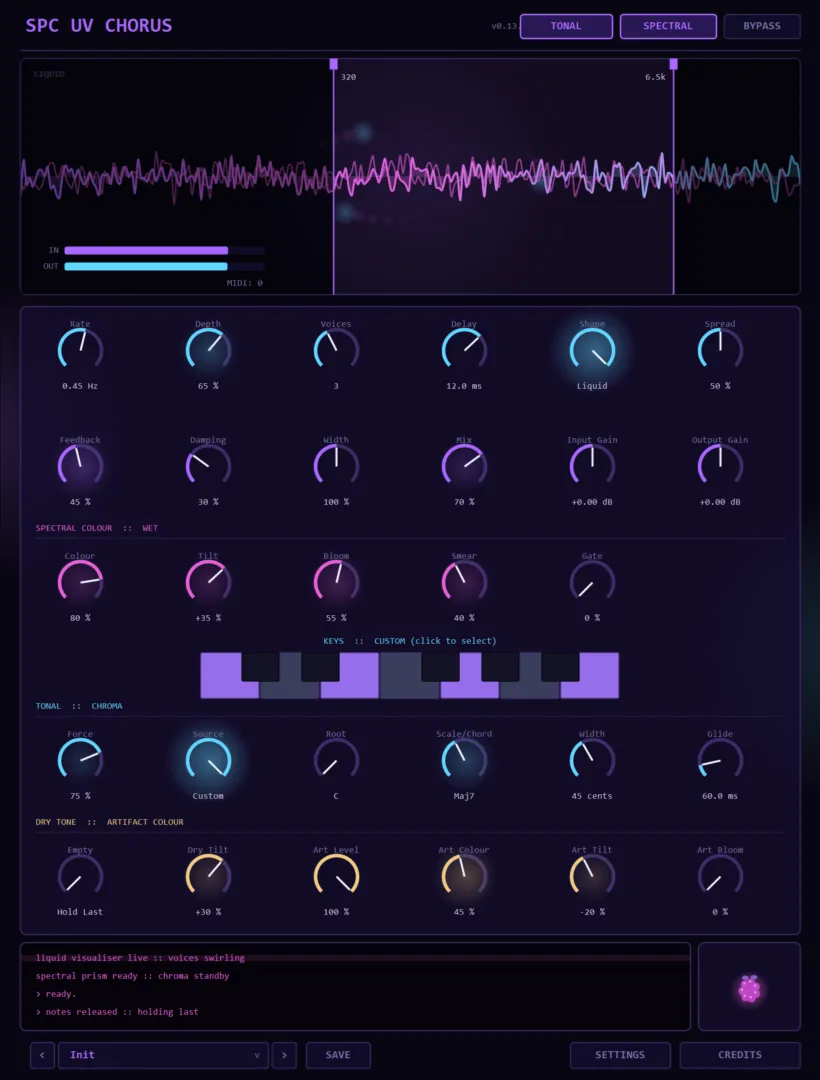
SPC UV Chorus is a chorus with two tricks nobody else plays. The first: it splits what it does into wet and artifacts — the chorus voices and the smear/detune residue they create — and runs each through its own spectral colouring engine. Colour, Tilt, Bloom, Smear and Gate shape the wet; a separate Art deck levels and colours just the artifacts; even the dry gets a tone tilt. The second trick is the Chroma-type tonal constraint: a Force knob that pulls the shimmer toward a key, a scale, any of 37 chord types, your own custom keys picked on the mini piano keyboard, or live MIDI it follows — with per-partial Width in cents and Glide between targets, so the movement always lands musically. Underneath is a proper liquid chorus: Rate, Depth, up to multiple voices, Shape (including the signature Liquid mode), Spread, Feedback, Damping and Width, with a frequency-range fence on the monitor to keep the swirl off your lows. And it follows the house rule — you only pay for what you use: the plain chorus is zero-latency time-domain with no FFT anywhere, the spectral engines engage only when a colour or tonal mode is active, and an idle instance sleeps at ~44× cheaper. Presets, named saves, settings with CPU/GPU display and the wildberry-purple UV Console complete it.
Available now — a one-time purchase, yours to keep.
Highlights
- Liquid chorus engine — rate, depth, voices, shapes, spread, feedback, damping, width
- Independent spectral colouring of dry, wet AND artifact paths
- Artifact deck — level and colour just the smear the chorus creates
- Chroma-type tonal constraint: key / scale / 37 chords / live MIDI / custom keys
- Mini piano keyboard for picking custom key sets
- Per-partial Width in cents and Glide between tonal targets
- Frequency-range fence keeps the chorus off your lows
- You only pay for what you use — clean path is zero-latency, idle sleep is ~44× cheaper
- Presets, named user saves, CPU/GPU display on the UV Console
At a glance
- Format
- CLAP audio effect (64-bit)
- OS
- Windows 10 / 11
- Host
- Any CLAP host — FL Studio 21.2+, Bitwig, Reaper…
- Version
- 0.13.1
Latest updates
Actively developed — recent fixes and improvements:
- Store release hardening — parameter and state handling verified against the official CLAP validator, so every host restores your session identically.
- Store release — account activation with offline license caching, installer and manual.
- Performance — idle sleep makes a loaded-but-quiet instance ~44× cheaper, and the default artifact path now runs a single chorus line with no second spectral engine until you actually colour the artifacts. Sound identical.
- Comfort — presets with named saves, the settings panel and credits.
- Earlier rounds: the frequency-range fence, the mini piano keyboard, the chorus-swarm animation and the Wildberry terminal.
Learn the technique
Not sure if this is the tool you need?
These free guides explain the job SPC UV Chorus does — read them first, then decide. No sign-up, no video, just the technique.
Made to be played
Every knob morphs the sound.
SPC UV Chorus is built for real-time sound design. Turn a control and the whole signal reacts at once — spectral colour, granular texture and modulation respond live, right in your DAW. Nothing is baked in: every parameter is fully automatable and MIDI-mappable, so you can draw evolving movement, morph a vector-scope signal, and lock in a one-of-a-kind sound no preset could give you.
Get SPC UV ChorusInside the plugin
Click any image to enlarge.