Canvas
Connected draggable workspaces, multiple page sizes, free placement, alignment, columns, rows, and tables.
Spectral Colors · free Windows business utility
Design a complete corporate invoice on a flexible canvas. Place every item, resize your logo, build a colour and type system, layer graphics and backgrounds, then save the layout and make it unmistakably yours.
Microsoft Store statusWaiting to be releasedWindows 10 / 11 · v0.1.4 · 66.8 MB · no account
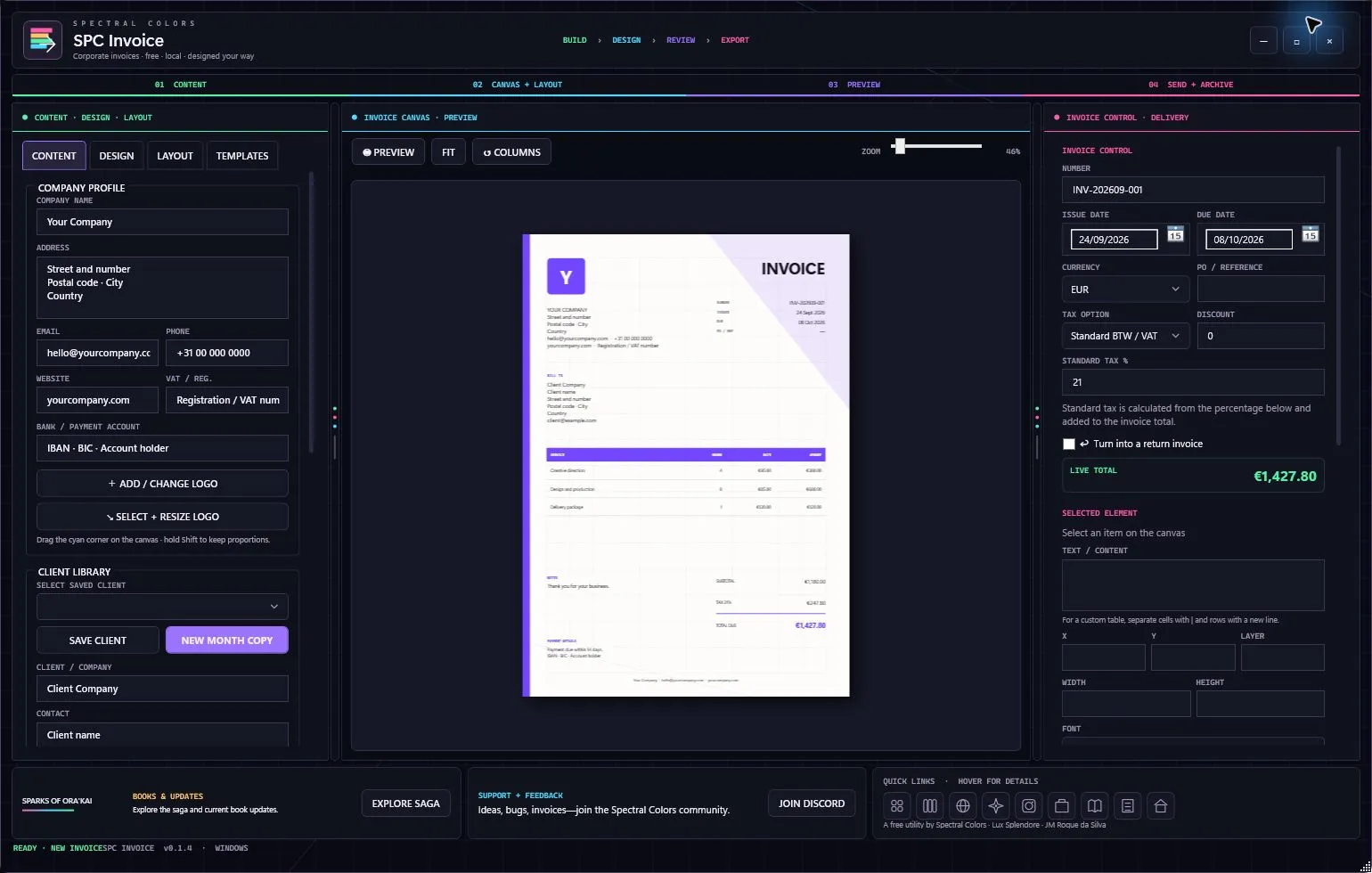
One calm path from blank page to client
SPC Invoice keeps visual freedom and dependable invoice logic in the same connected workspace.
Add company details, choose the page size, place the logo, and resize it until the hierarchy feels right.
Choose colours, typography, backgrounds, SVG graphics, rows, columns, and tables, then align every element precisely.
Save the layout as a template, add a client, preview the result, and export a polished PDF or PNG.
A complete invoice design system
Shape the page, visual hierarchy, brand language, and reusable layout while the invoice tools handle the practical work.
Connected draggable workspaces, multiple page sizes, free placement, alignment, columns, rows, and tables.
Resizable logo, company details, colour templates, RGB Vector 3 colour pickers, HEX entry, fonts, styles, and cursive or bold text.
Layer backgrounds with built-in shapes or upload a custom SVG to create a distinctive corporate look.
Use line-item presets with automatic subtotal, discount, tax, and total calculations — or keep a column manual.
Save client records and create a new-month copy with an updated invoice date and number.
Preview, export, copy a rendered invoice, locate its local backup, upload to Drive, or open the default email app.
Build your own visual language
Treat the invoice like a real design canvas. Combine exact colour values, typography, logo scale, custom graphics, and structured layout rules, then save the finished direction for every client and every month.
#8D65FFFree from Spectral Colors
No subscription, account, ads, or telemetry. The installer includes the runtime.
Good to know
Yes. Add the logo to the canvas, resize it, and place it anywhere in the layout.
Yes. Save the client, then create a new-month copy with refreshed date and invoice number while preserving the design and line-item structure.
You choose the export location. SPC Invoice also keeps a separate local backup organized by month, and the Locate button can reveal it.
The direct website installer is not yet code-signed. Download it only from spectral-colors.com and verify the SHA-256 value if needed.