Plugins
SPC Prism Q: the EQ that refuses to melt your laptop
On this page4 sections
It’s late. Your session has sixty tracks, because the song demanded it. Your CPU meter is creeping into the red, your laptop fan has opinions, and the plugin doing most of the damage is… an EQ. The most basic tool in mixing.
We think that’s absurd. So we built SPC Prism Q — the first plugin of our new SPC line: everyday tools engineered to be light enough for every track, not just the important ones.
The rule the whole engine is built on
Prism Q follows one law, everywhere in its code: you only pay for what you use.
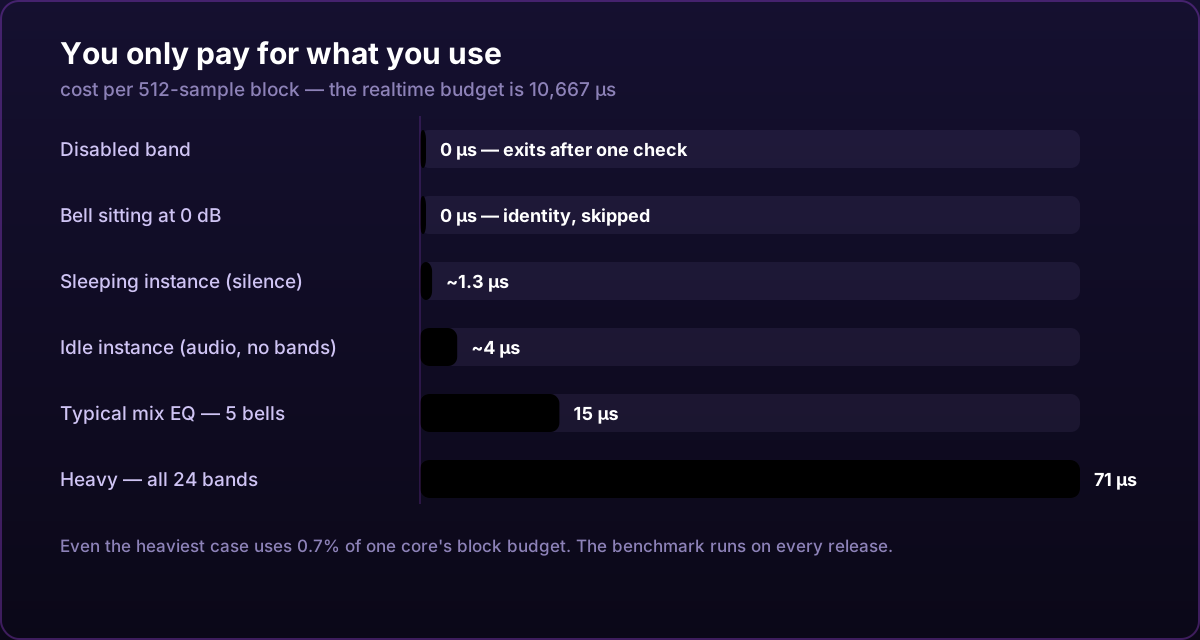
- A disabled band costs nothing — it exits after a single check.
- A bell sitting at 0 dB costs nothing.
- The analyzer only runs while the window is open.
- The spectral engine doesn’t even allocate memory until a band asks for it.
- An instance receiving true silence falls asleep and costs almost literally nothing.
That’s not a slogan. It’s an architecture — and because “lightweight” is the easiest claim in the plugin industry to fake, we measure it.
Real numbers, measured on every release
Our benchmark loads the plugin exactly the way your DAW does and streams real audio through it. These are the current v1.8.1 numbers, per 512-sample block at 48 kHz, on a single CPU core:
| Scenario | Cost per block | Instances per core |
|---|---|---|
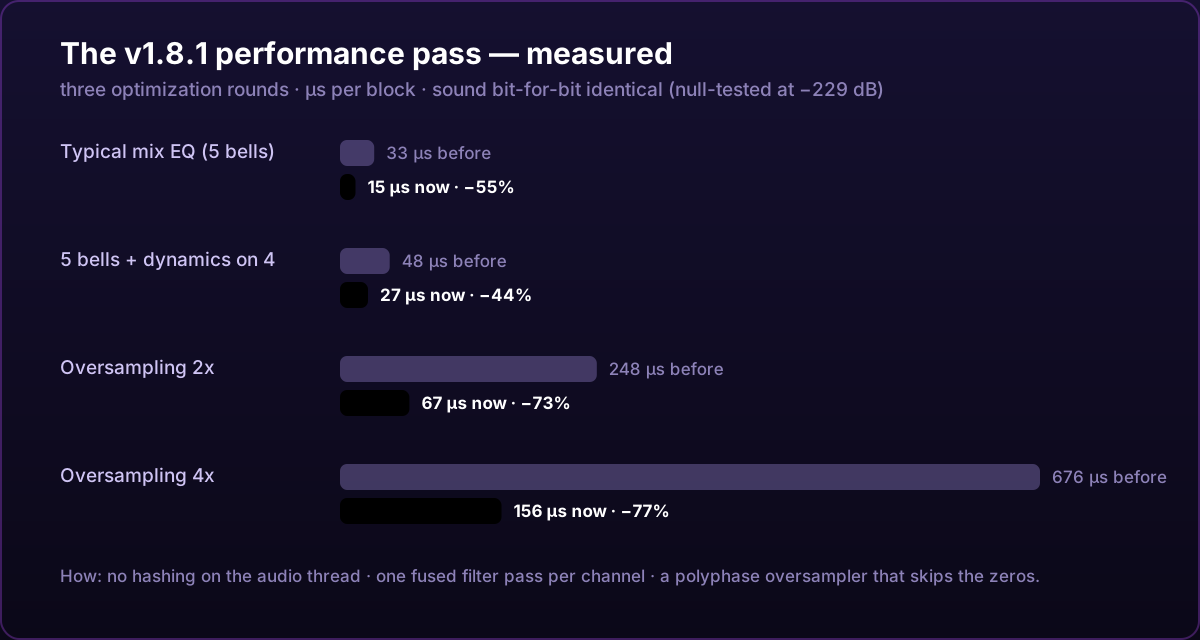
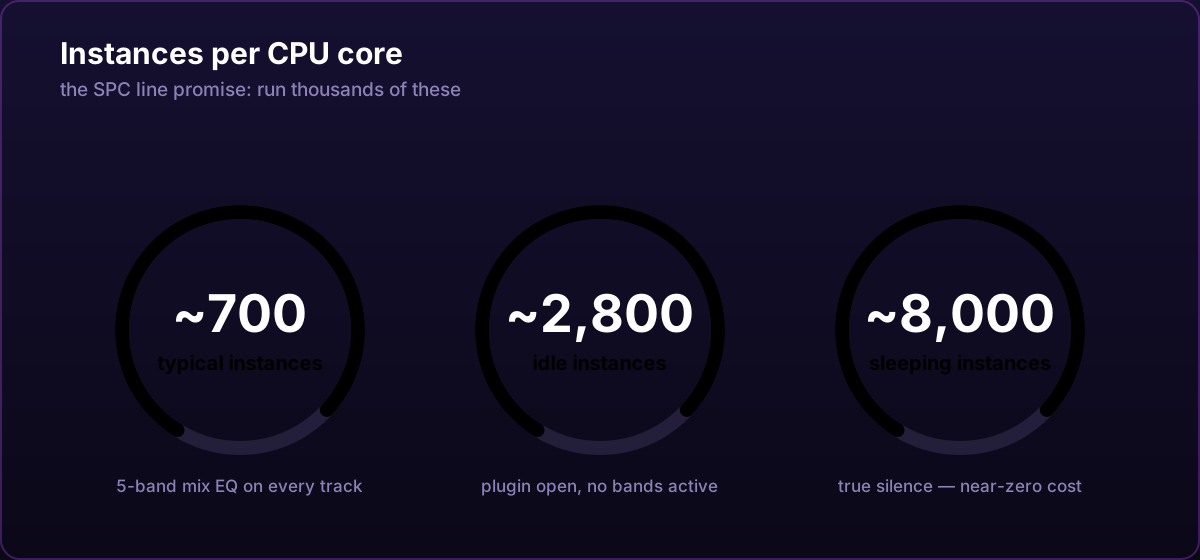
| Typical mix EQ (5 bells) | 15 µs | ~700 |
| Heavy — all 24 bands + steep cuts | 71 µs | ~150 |
| 5 bells with dynamics riding on 4 | 27 µs | ~400 |
| Oversampling 2x | 67 µs | ~160 |
| Oversampling 4x | 156 µs | ~68 |
| Idle instance (audio playing, no bands) | ~4 µs | ~2,800 |
| Sleeping instance (true silence) | ~1.3 µs | ~8,000 |
For context: the realtime budget for one of those blocks is 10,667 µs. A typical Prism Q instance uses 0.14% of it.
And here’s the part we’re most proud of: version 1.8.1 made the typical case about twice as fast as the week before — and the sound is bit-for-bit identical. We can say that with a straight face because every build runs null tests that compare output at −229 dB. If an optimization changed one bit of audio, the release would fail.
Light does not mean shallow
The trap with lightweight EQs is that they’re usually empty. Prism Q takes the opposite bet — it’s light so that it can afford to be deep:
24 rainbow bands. Double-click the glass display and a band appears, colored by its frequency — red for the lows climbing to violet for the highs, the same order as real light. Nine filter types, cut slopes from 6 to 96 dB/oct, and every band can live on Stereo, Mid, Side, Left or Right.
Dynamics on every point. Press DYN and that EQ point becomes a dynamic band with five characters — Clean, VCA, FET, Opto, or a full OTT-style mode. Cuts do something special: they ride their own cutoff frequency, like a classic auto-filter, per point.
The Prism. Press PRISM and the point starts bending light: DENOISE, SMEAR, FREEZE, SHIFT, AIR and GHOST — spectral effects that normally cost a dedicated plugin each, focused exactly where your band sits, all running on one shared engine that only wakes when asked.
No manual required. Hover any control — any knob, any button, any switch in the settings — and a small hint explains what it does and how to use it.
Buy once. Own it. Forever.
SPC Prism Q will be a one-time purchase, like everything Spectral Colors makes. No subscription, no rental plan, no “premium tier”. You buy the tool, the tool is yours, and after the first activation the license verifies offline — no internet needed to make music.
Spectral Colors is a solo operation in the Netherlands: one producer-developer building the tools he wants to use, testing every release in FL Studio with real music. When you buy a plugin here, that’s what you’re supporting.
SPC Prism Q is coming very soon to the shop — CLAP, Windows x64, for FL Studio, Bitwig, Reaper and every other CLAP host. You can already explore the full feature breakdown (and play with a live in-browser miniature of the display) on the plugin page.