Guides
Dynamic EQ explained: when to use it instead of a compressor
On this page6 sections
You’re mixing a vocal. Every time the singer pushes, a harsh resonance jumps out and stabs you in the ear. You reach for a compressor — it tames the peak, but now the whole vocal feels flat and lifeless.
There’s a better tool for this exact job: dynamic EQ. Here’s what it actually does, when it beats a compressor, and how to set it up without overthinking every parameter.
What is dynamic EQ, really?
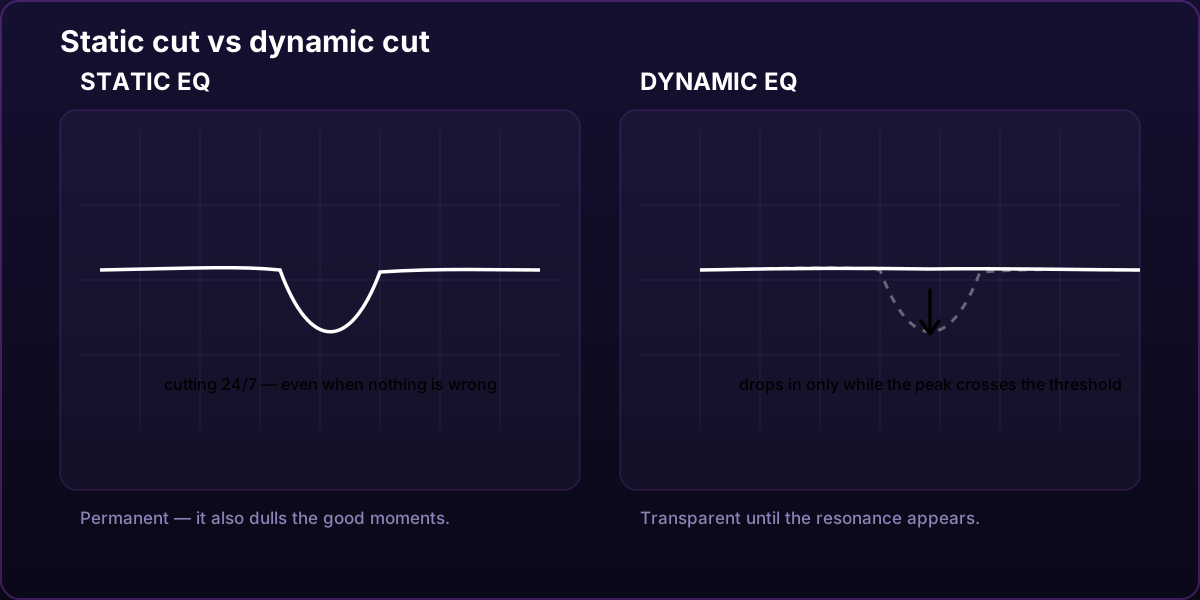
A standard parametric EQ is static. Cut 3 dB at 4 kHz and that cut stays there forever — whether the vocal is whispering or screaming. Fine for broad tonal shaping, terrible for problems that only show up sometimes. A permanent notch fixes the harsh moment but also dulls every syllable that was never a problem.
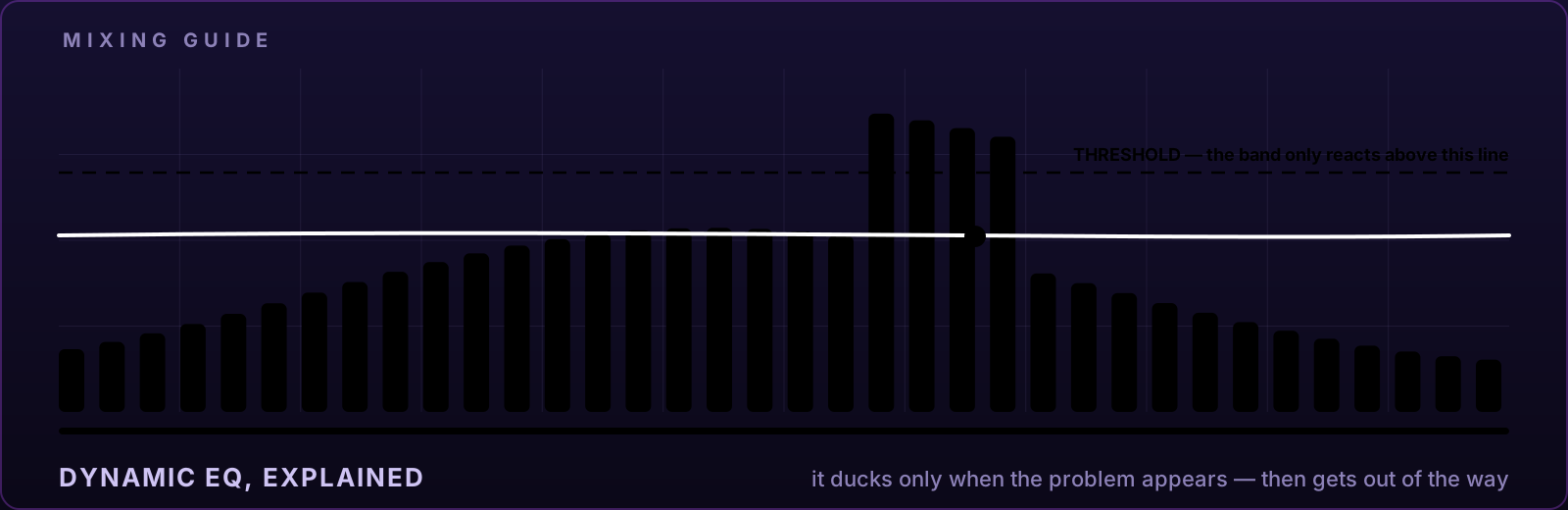
A dynamic EQ band listens first. It only moves when the energy in its own frequency range crosses a threshold. Frequency gets too loud → the band ducks it. Frequency settles down → the band gets out of the way.
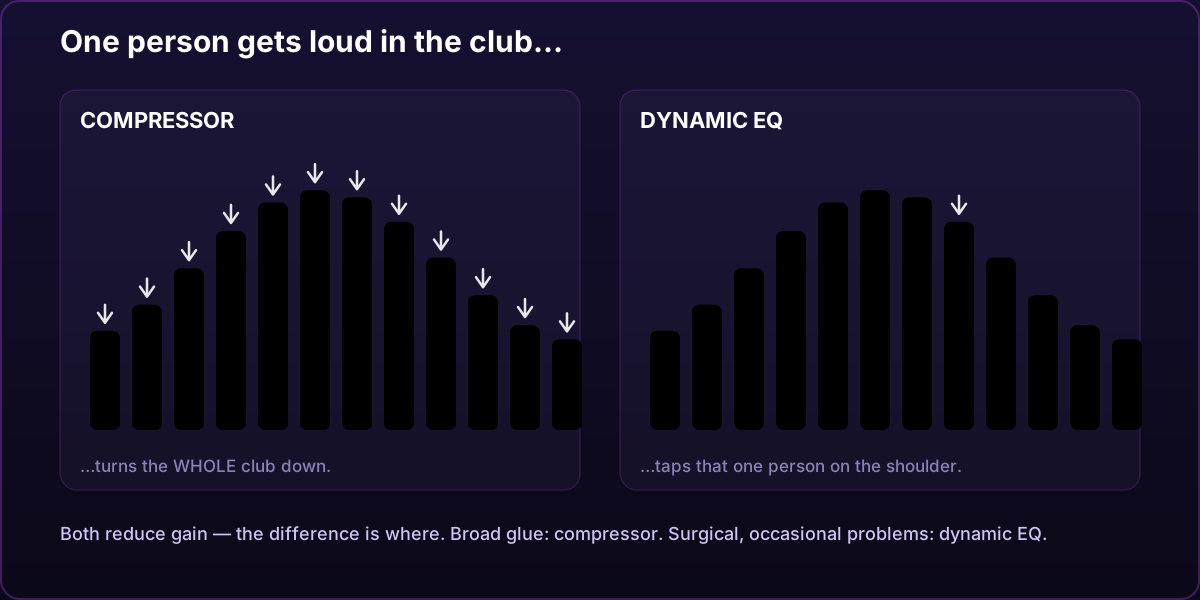
Think of it like a smart bouncer. A compressor turns down the volume of the entire club whenever one person gets too loud. A dynamic EQ walks over to that one person and taps them on the shoulder — everyone else keeps dancing.
Dynamic EQ vs compression: the real difference
Both are gain-reduction tools, so why does it matter?
Where the reduction happens. A compressor reads the entire signal and turns everything down. It doesn’t care whether the problem is muddy 200 Hz buildup or a piercing 6 kHz spike — everyone gets quieter. A dynamic EQ reads one frequency region and touches only that region.
Compression is still the right tool for glue — broad, gentle level control that makes a performance feel like one thing. Dynamic EQ is the right tool for surgical, occasional problems. Most professional mixes use both.
If you are deciding between two frequency-selective processors, see the focused comparison: dynamic EQ vs multiband compression.
When to reach for dynamic EQ
- Resonances that come and go. A vocal honk around 900 Hz that only appears on certain vowels. A static cut thins the good parts; a dynamic band steps in only when the honk does.
- De-essing without the robot voice. Put a narrow dynamic band at 6–9 kHz instead of a blunt de-esser — you control exactly the width and depth.
- Low-mid mud on the mix bus. Energy piles up between 100–300 Hz when many tracks stack. A gentle dynamic band there cleans the mud only when it actually builds up — your drops keep their power.
- 808 vs kick. A dynamic cut on the bass around the kick’s fundamental tames the collision only at the moments they fight.
- Harsh hi-hats or synth spikes that only sting on certain notes.
For a vocal-specific workflow, continue with how to use dynamic EQ on vocals. If you are still identifying the problem, start with why vocals sound muddy and how to fix them.
Setting it up in SPC Prism Q, step by step
In SPC Prism Q any EQ point can become dynamic — select a band and press DYN. Then:
- Find the problem frequency. Boost the band a few dB and sweep until the ugly part jumps out. Narrow the band (scroll on the point) until you’ve isolated it. Set the gain back toward 0.
- Let AUTO set the threshold. Prism Q’s AUTO mode tracks the band’s own average level and puts the threshold just above it — the band then reacts to peaks, not to the whole performance. (You can drag the threshold line right in the display when you want manual control.)
- Set the range. −3 to −6 dB of ride is plenty for most problems. If you need −12, the problem is probably arrangement, not EQ.
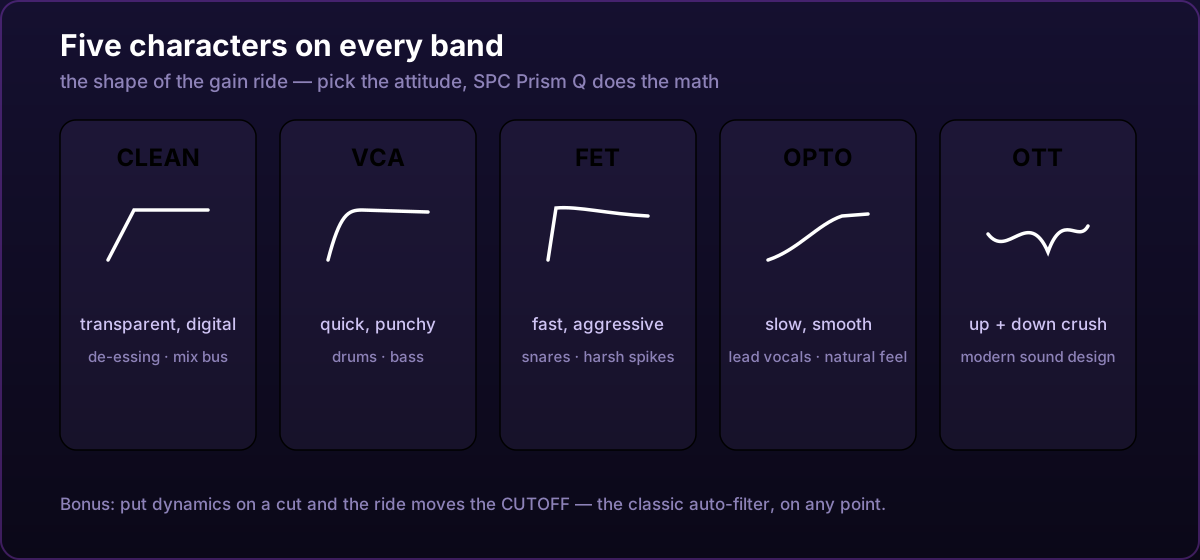
- Pick a character. This is where the color lives:
- CLEAN — transparent, digital, no attitude. De-essing, mix bus.
- VCA — quick and punchy. Drums, bass.
- FET — fast, aggressive, grabs transients. Snares, harsh vocal spikes.
- OPTO — slow and smooth, program-dependent. Lead vocals, natural feel.
- OTT — upward and downward, the modern sound-design crush.
- One special trick: dynamic cuts. Put dynamics on a low-cut or high-cut in Prism Q and the ride moves the cutoff frequency instead of gain — a high-cut that darkens when the signal gets loud is the classic auto-filter, now living on any cut point.
Common mistakes
- Making everything dynamic. If the tone is always wrong, use a static band. Dynamic EQ is for problems that come and go.
- Ranges that are too deep. A −12 dB dynamic notch pumps audibly. Small moves, musical results.
- Thresholds set blind. If the band never moves, or is always moving, the threshold is wrong. You want it riding the peaks. Watch the live gain-ride meter.
- Fixing arrangement problems with EQ. If two instruments always fight, one of them should probably move — an octave, a pan position, or out of the song.
Try it in your next mix
Dynamic EQ used to be the expensive feature in the expensive plugin. In SPC Prism Q it’s on every one of the 24 bands, with all five characters, at a fraction of the CPU cost — the whole plugin is measured at roughly 700 typical instances per CPU core, so putting a dynamic band on every track of your session is not a luxury anymore. It’s just how you mix.
SPC Prism Q is available in the shop, and its plugin page has a live in-browser miniature of the display you can play with before you buy.
Frequently asked questions
What is dynamic EQ?
Dynamic EQ changes the gain of a selected EQ band in response to the signal. Unlike a static EQ cut or boost, it can act only when that frequency region crosses a threshold.
Is dynamic EQ the same as multiband compression?
No. Both apply frequency-selective dynamics, but a dynamic EQ moves individual EQ bands while a multiband compressor divides the signal at crossover points and compresses the resulting ranges.
Should dynamic EQ replace regular EQ?
Usually not. Static EQ is the simpler choice for a tonal problem that is always present. Dynamic EQ is most useful when a resonance, buildup or harshness appears only at certain moments.